Data Architecture Domain Module
Turning data from liability into asset.
Data Architecture is where technical implementation meets data reality. It defines how the organisation stores, moves, transforms, and ensures the quality of its data — not the business meaning and classification (that's Information Architecture), but the technical foundation that makes data actually work: the models, pipelines, platforms, and quality controls.
Many organisations treat it as a by-product of systems rather than an asset to be architected. The result? Data scattered across dozens of databases with no clear lineage. ETL jobs that nobody understands running overnight with no monitoring. "Golden sources" that aren't actually golden. Analytics teams spending 80% of their time finding and cleaning data instead of analysing it.
Data Architecture, done right, creates the technical foundation for data that's trustworthy, accessible, and fit for purpose — including the AI and analytics workloads that increasingly drive competitive advantage. Done poorly, it produces data warehouses nobody trusts and integration patterns that create more problems than they solve.
This module provides the practical foundation for data architecture that connects to governance and enables the organisation to actually use its data.
What This Module Provides
| Artefact | Purpose |
|---|---|
| Data Model Standards | How data is structured — logical and physical modelling approaches |
| Data Storage Patterns | Where data lives and why — platforms, technologies, and placement decisions |
| Data Pipeline Architecture | How data moves and transforms — ingestion, transformation, and distribution |
| Data Quality Framework | How data is validated and maintained — rules, monitoring, and remediation |
| Data Lineage Model | Where data comes from and where it goes — traceability from source to consumption |
| MDM Implementation | How master data is technically managed — synchronisation, matching, and distribution |
How It Plugs Into the Governance Core
Data Architecture doesn't operate in isolation. It connects to every component of the Governance Core:
Guardrails Framework — Data guardrails define the technical boundaries for data management. "All data stores must have defined retention policies." "Real-time replication requires approval for latency-critical data." "Analytics workloads consume from the lakehouse, not operational databases." These become the constraints within which data decisions happen.
Decision Records — When a decision involves data platform selection, modelling approaches, or pipeline patterns, the data architecture context gets captured. "We chose event streaming over batch ETL because latency requirements preclude overnight processing and our Technology Radar has Kafka in 'Adopt'."
Architecture Passport — Each system's passport includes its data architecture context: what data it owns, what it consumes, its role in data flows (source, transformer, consumer), and its data quality obligations. This makes data dependencies visible across the portfolio.
Tiered Oversight — Data risk factors into oversight tier. Systems that are authoritative sources for master data, that handle sensitive data classifications, or that feed critical analytics typically warrant higher scrutiny. A new reporting dashboard consuming existing data is Tier 3. A new master data hub is definitely Tier 1.
Technical Debt Register — Data debt is often invisible until it causes problems. Undocumented data transformations. ETL jobs with hardcoded business logic. Duplicate data stores that have drifted out of sync. Data quality issues that everyone works around. This debt needs visibility — it affects every downstream consumer.
Delivery Integration — Data architecture questions should surface during delivery:
- Sprint planning: "What new data entities does this feature create? Where will they be stored?"
- Design reviews: "Does this align with our data platform strategy? Are we creating new data silos?"
- Definition of Done: "Has data lineage been documented? Are data quality rules in place?"
Architecture Registry — This module populates the data layer of your registry: data stores, data flows, pipeline definitions, quality metrics, and the relationships between them.
Core Artefacts
Data Model Standards
Data modelling creates shared understanding of how data is structured. Not the business meaning (that's Information Architecture's glossary), but the technical representation — entities, attributes, relationships, and constraints.
Why it matters: Without modelling standards, every project makes different choices. Some teams normalise everything, others denormalise for performance. Naming conventions vary wildly. Relationships get implemented inconsistently. The result is a data landscape that's impossible to integrate and painful to maintain.
The modelling layers:
| Layer | Purpose | Audience | Stability |
|---|---|---|---|
| Conceptual | High-level entities and relationships | Business stakeholders, architects | Stable — changes with business model |
| Logical | Detailed attributes, keys, relationships (technology-agnostic) | Data architects, analysts | Moderately stable |
| Physical | Implementation-specific: tables, indexes, partitions, data types | Database developers, DBAs | Changes with technology and performance needs |
Most organisations don't need all three layers for everything. Start with logical models for your core domains — they're detailed enough to be useful but abstract enough to survive technology changes.
Naming conventions matter more than you think. When you're debugging a production issue at 2am, cust_ord_dtl_hist is a lot harder to work with than customer_order_detail_history. Establish conventions early:
- Tables/entities: Singular nouns (
Customer, notCustomers) - Columns/attributes: Clear, unabbreviated names where practical
- Keys: Consistent patterns (
customer_id,order_id) - Dates: Include timezone handling expectations
- Flags/indicators: Boolean naming (
is_active,has_shipped)
Government context: Many government data standards mandate specific naming conventions and data types. Queensland Government agencies should reference QGEA data standards. Australian Government agencies should check the National Data Standards and related policies. Build compliance into your standards rather than retrofitting.
Data Storage Patterns
Where data lives matters. The choice of storage platform affects performance, cost, scalability, security, and what you can actually do with the data.
Why it matters: The database that's perfect for transactional processing is terrible for analytics. The data lake that handles unstructured data brilliantly is overkill for simple reference data. Storage decisions made without considering the full picture create expensive migrations later.
Storage pattern categories:
| Pattern | Use Case | Examples | Considerations |
|---|---|---|---|
| Transactional (OLTP) | Operational systems, high-volume transactions | PostgreSQL, SQL Server, Oracle | Optimised for writes, ACID compliance |
| Analytical (OLAP) | Reporting, analysis, aggregations | Snowflake, BigQuery, Redshift | Optimised for reads, columnar storage |
| Data Lake | Raw data storage, schema-on-read, diverse formats | Azure Data Lake, S3, GCS | Cheap storage, flexible schema, requires governance |
| Data Lakehouse | Combined lake + warehouse capabilities | Databricks, Delta Lake | Best of both worlds, newer pattern |
| Document Store | Semi-structured data, flexible schemas | MongoDB, Cosmos DB | Good for JSON, limited joins |
| Key-Value | Caching, session data, simple lookups | Redis, DynamoDB | Fast, simple, limited querying |
| Graph | Relationship-heavy data, networks | Neo4j, Neptune | Excellent for connections, niche use cases |
| Time Series | IoT, metrics, logs | InfluxDB, TimescaleDB | Optimised for time-based queries |
The modern data platform pattern:
Most organisations are converging on a variation of this pattern:
┌─────────────────────────────────────────────────────────────────────┐
│                         CONSUMPTION LAYER                           │
│    BI Tools │ Data Science │ Applications │ APIs │ AI/ML Workloads  │
├─────────────────────────────────────────────────────────────────────┤
│                         SERVING LAYER                               │
│    Data Warehouse │ Data Marts │ Feature Store │ Semantic Layer     │
├─────────────────────────────────────────────────────────────────────┤
│                      TRANSFORMATION LAYER                           │
│         Data Processing │ Quality Rules │ Business Logic            │
├─────────────────────────────────────────────────────────────────────┤
│                         STORAGE LAYER                               │
│          Data Lake │ Lakehouse │ Raw Zone │ Curated Zone            │
├─────────────────────────────────────────────────────────────────────┤
│                        INGESTION LAYER                              │
│         Batch │ Streaming │ CDC │ APIs │ File Uploads               │
├─────────────────────────────────────────────────────────────────────┤
│                          DATA SOURCES                               │
│    Operational Systems │ External Feeds │ SaaS │ IoT │ Documents    │
└─────────────────────────────────────────────────────────────────────┘
You don't need to implement all layers at once. Start with what solves your immediate pain, but design with this architecture in mind so you're not rebuilding later.
Data placement principles:
- Operational data stays operational — Don't run analytics against production databases. Extract and transform for analytical use.
- Hot, warm, cold tiering — Not all data needs fast storage. Recent data hot, historical data progressively colder.
- Single write, multiple read — Data should have one authoritative place where it's written, with controlled distribution to consumers.
- Right tool for the job — Don't force everything into one platform. Use appropriate storage for each use case.
Data Pipeline Architecture
Data pipelines move and transform data from sources to destinations. They're the plumbing of your data architecture — invisible when working well, catastrophic when they fail.
Why it matters: Without deliberate pipeline architecture, you end up with spaghetti: point-to-point connections, undocumented transformations, jobs that fail silently, and no way to trace where data came from. When something breaks, nobody knows where to look.
Pipeline patterns:
| Pattern | Characteristics | Use Case |
|---|---|---|
| Batch/ETL | Scheduled, high volume, latency-tolerant | Nightly data warehouse loads, reporting |
| Streaming | Continuous, low latency, event-driven | Real-time analytics, operational dashboards |
| Change Data Capture (CDC) | Captures changes from source systems | Keeping replicas in sync, event sourcing |
| Micro-batch | Small frequent batches, near-real-time | Compromise between batch and streaming |
| ELT | Load raw, transform in destination | Modern cloud warehouses, lakehouse patterns |
ETL vs ELT
Traditional Extract-Transform-Load (ETL) transforms data before loading. Modern Extract-Load-Transform (ELT) loads raw data first, then transforms in the destination. ELT is often cheaper and more flexible with modern cloud platforms — you keep the raw data and can re-transform as requirements change.
Pipeline design principles:
- Idempotent by design — Running a pipeline twice should produce the same result. No duplicates, no missing data.
- Observable — Every pipeline should have logging, monitoring, and alerting. If it fails, you should know within minutes.
- Recoverable — Failures happen. Pipelines should support re-running from failure points, not just from scratch.
- Version controlled — Pipeline code is code. It belongs in version control with proper CI/CD.
- Documented — What does this pipeline do? What are its dependencies? Who owns it?
Orchestration matters: Individual pipelines need orchestration — scheduling, dependency management, retry logic, alerting. Tools like Apache Airflow, Azure Data Factory, or dbt Cloud provide this. Don't build your own scheduler with cron jobs and bash scripts.
Data Quality Framework
Data quality is where data architecture meets reality. You can have perfect models and elegant pipelines, but if the data itself is wrong, nothing else matters.
Why it matters: Poor data quality is expensive. It causes incorrect reports, failed processes, customer complaints, compliance issues, and eroded trust. By the time quality issues surface in a dashboard, they've often propagated through multiple systems.
Quality dimensions:
| Dimension | What It Means | Example Check |
|---|---|---|
| Accuracy | Data reflects reality | Customer email matches verified email |
| Completeness | Required data is present | No null values in mandatory fields |
| Consistency | Same data, same value across systems | Customer address matches in CRM and billing |
| Timeliness | Data is current enough for its purpose | Order data loaded within 4 hours of transaction |
| Validity | Data conforms to expected formats | Phone numbers match expected patterns |
| Uniqueness | No unintended duplicates | One customer record per actual customer |
Quality implementation approaches:
| Approach | When to Apply | Example |
|---|---|---|
| Schema validation | Data ingestion | Reject records that don't match expected structure |
| Business rules | Transformation | Flag orders with negative quantities |
| Referential integrity | Cross-system | Ensure customer_id exists in customer master |
| Statistical monitoring | Ongoing | Alert when daily record counts vary by >20% |
| Reconciliation | Periodic | Compare totals between source and target |
Quality as code: Modern data quality treats rules as code — version controlled, tested, deployed through CI/CD. Tools like Great Expectations, dbt tests, or Monte Carlo embed quality checks into pipelines rather than running them as afterthoughts.
The quality feedback loop:
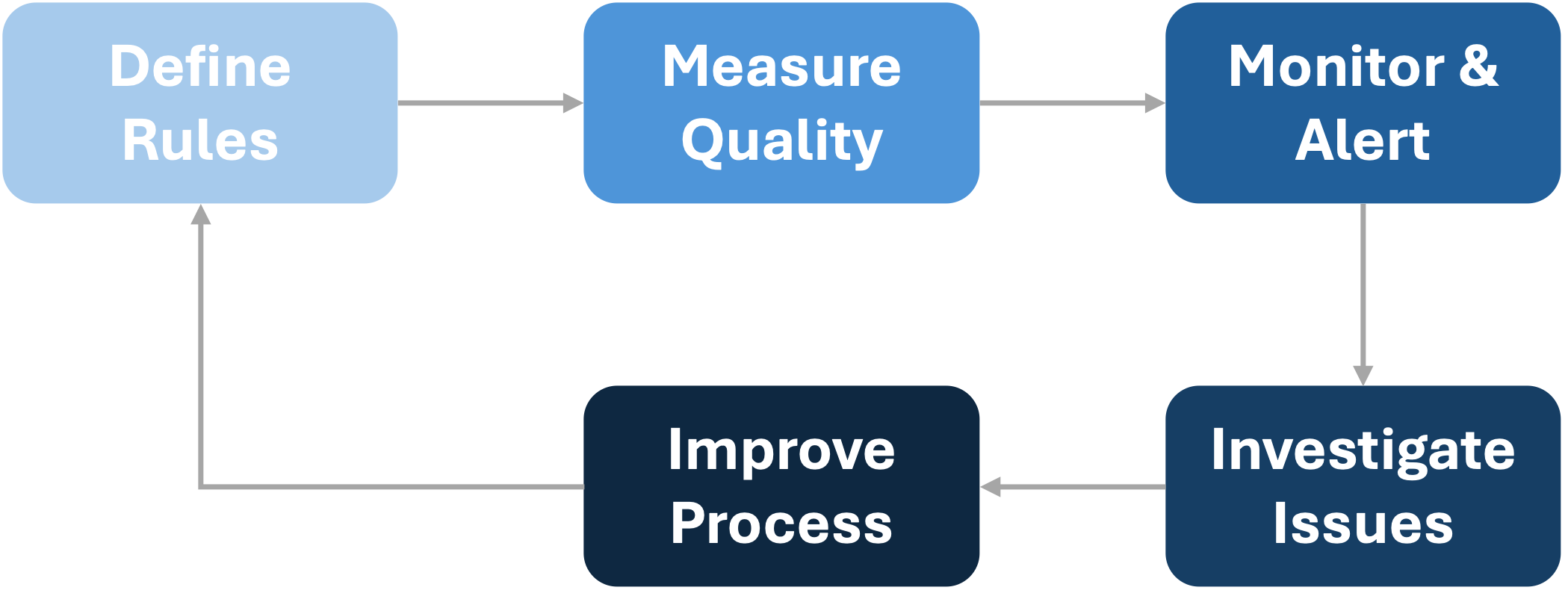
┌──────────────┐     ┌──────────────┐     ┌──────────────┐
│    Define    │────▶│   Measure    │────▶│   Monitor    │
│    Rules     │     │   Quality    │     │   & Alert    │
└──────────────┘     └──────────────┘     └──────────────┘
       ▲                                         │
       │                                         ▼
       │              ┌──────────────┐     ┌──────────────┐
       └──────────────│   Improve    │◀────│  Investigate │
                      │   Process    │     │   Issues     │
                      └──────────────┘     └──────────────┘
Quality isn't a one-time project. It's an ongoing process of measurement, detection, investigation, and improvement.
Data Lineage Model
Data lineage tracks where data comes from, how it's transformed, and where it goes. It's the audit trail that answers "why does this report show that number?"
Why it matters: When a dashboard shows unexpected results, you need to trace backwards through every transformation to find where things went wrong. When regulations require you to prove data provenance, you need lineage. When you're assessing the impact of changing a source system, you need to know what depends on it.
Lineage granularity:
| Level | What It Tracks | Use Case |
|---|---|---|
| System | Source system → Target system | Impact analysis, dependency mapping |
| Dataset | Table → Table | Data flow documentation |
| Column | Source column → Target column | Detailed transformation tracking |
| Row | Individual record provenance | Audit, compliance, debugging |
Start with system and dataset lineage — they're achievable manually. Column-level lineage typically requires tooling. Row-level lineage is rarely needed outside specific compliance scenarios.
Lineage capture approaches:
- Manual documentation — Maintained by data engineers. Low cost, high maintenance burden, tends to drift from reality.
- Metadata extraction — Parse pipeline code, SQL, and configurations to infer lineage. More accurate, requires tooling.
- Runtime capture — Capture actual data flows during execution. Most accurate, highest overhead.
- Hybrid — Automated capture supplemented with manual documentation for business context.
AI and analytics context: Lineage becomes critical for AI/ML workloads. When a model makes a decision, regulators and stakeholders may ask: where did the training data come from? What transformations were applied? Is there bias introduced in the pipeline? Without lineage, these questions are unanswerable.
Master Data Management Implementation
Master Data Management (MDM) ensures that core business entities — customers, products, suppliers, employees — have consistent, accurate representation across systems. Information Architecture defines the master data domains and business rules. Data Architecture implements the technical solution.
Why it matters: Without MDM, the same customer exists as three different records in three different systems, with three different addresses and no way to get a unified view. Sales can't see support history. Finance can't reconcile orders. Analytics produces conflicting numbers.
MDM implementation styles:
| Style | How It Works | Pros | Cons |
|---|---|---|---|
| Registry | Index pointing to records in source systems | Non-invasive, quick to implement | No data quality improvement at source |
| Consolidation | Copy data to central hub, cleanse, match | Clean golden record for analytics | Source systems unchanged |
| Coexistence | Central hub syncs back to sources | Best quality, enterprise-wide | Most complex, requires source system changes |
| Transaction | Central hub is the system of record | Highest control | Major change, rarely achievable |
Most organisations start with registry or consolidation approaches. Full transaction-style MDM is a multi-year transformation that requires significant business commitment.
MDM technical components:
- Data profiling — Understand what's actually in your data before you try to match it
- Matching & merging — Algorithms to identify duplicates and create golden records
- Survivorship rules — When records conflict, which value wins?
- Hierarchy management — Parent-child relationships (customer → accounts → contacts)
- Distribution — How golden records get back to consumers
Government context: Cross-agency data sharing often requires MDM-like capabilities. Citizen identity, business registry, and location data are common candidates. Privacy legislation (particularly the Australian Privacy Principles) creates specific obligations around how personal master data is collected, used, and disclosed. Build privacy into your MDM design, not as an afterthought.
Integration with Other Domain Modules
Data Architecture shapes and is shaped by every other domain:
| Domain | What Data Architecture Provides | What Data Architecture Consumes |
|---|---|---|
| Business Architecture | Data dependencies by capability. Analytics foundation for business metrics. | Business priorities that drive data investment. Which capabilities are data-intensive. |
| Information Architecture | Technical implementation of glossary terms. Data dictionary mapping to business glossary. Physical realisation of information flows. | Business context for data models. Master data domain definitions. Information classification requirements. |
| Technology Architecture | Data platform requirements for technology decisions. Integration patterns for data movement. | Platform capabilities and constraints. Approved technologies for data storage and processing. |
| Security Architecture | Data classification implementation. Encryption and masking requirements by data type. | Security requirements by data classification. Access control requirements. Compliance obligations. |
| Innovation Architecture | Data readiness for AI/ML initiatives. Feature engineering foundations. Analytics platform capabilities. | Emerging technology requirements. AI/ML data consumption patterns. |
The Information-Data relationship deserves emphasis: Information Architecture and Data Architecture are complementary domains that must work together:
- Information Architecture defines business meaning → Data Architecture implements technical storage
- Glossary terms → Data dictionary fields
- Information flows → Data pipelines
- Master data concepts → MDM implementation
- Classification models → Database security controls
Keep them aligned but don't conflate them. Business stakeholders care about information. Technical teams implement data. The architecture bridges both.
Populating the Architecture Registry
This module provides the content that populates the data layer of your Architecture Registry. If you've established the registry structure from the Governance Core but have empty data architecture sections, this is where the content comes from.
What goes in the registry:
| Entity | Source |
|---|---|
| Data stores | Storage inventory |
| Data flows | Pipeline documentation |
| Data entities | Data models |
| Quality rules | Quality framework |
| Lineage maps | Lineage documentation |
| MDM domains | MDM implementation |
| Pipeline definitions | Pipeline architecture |
| Platform components | Data platform inventory |
Relationship integrity: The power of the registry comes from relationships. Every data store should link to its owning application. Every pipeline should link to source and target data stores. Every quality rule should link to the entities it validates. Every data entity should link to its Information Architecture glossary term. Without these relationships, you have disconnected lists instead of architecture.
Anti-Patterns to Avoid
The Unmanaged Data Swamp
Symptoms: Created a data lake. Dumped everything in it. Nobody can find anything. Data quality is unknown. The "lake" has become a swamp of undocumented, untrusted data.
Root cause: Storage is cheap, governance is hard. Without cataloguing, quality rules, and access controls, a data lake quickly becomes useless.
Fix: Implement data zones (raw, cleansed, curated) with quality gates between them. Catalogue everything. Apply access controls. If data doesn't meet quality standards, it doesn't graduate to curated zones.
ETL Spaghetti
Symptoms: Dozens of ETL jobs, many undocumented. Point-to-point connections everywhere. Changes in one system cause cascading failures. Nobody fully understands the dependencies.
Root cause: Each project built what it needed without considering the whole. No integration patterns, no central orchestration.
Fix: Establish integration patterns and enforce them through guardrails. Introduce orchestration. Document all pipelines. Gradually refactor the worst offenders.
The Accidental Data Warehouse
Symptoms: Started as "just a reporting database." Now it's the source of truth for everything. Undocumented transformations that embed business logic. One person who understands it is about to retire.
Root cause: Organic growth without architecture. Quick fixes that became permanent.
Fix: Document what exists before that person leaves. Treat it as technical debt. Plan migration to a properly architected solution. Don't add new complexity to the old system.
Golden Source Mythology
Symptoms: Multiple systems claim to be the "golden source" for the same data. None of them actually are. Analytics teams pick whichever source gives them the number they want.
Root cause: MDM decision never made or not enforced. Systems implemented in isolation.
Fix: Actually decide which system is authoritative. Document it. Enforce it through guardrails. Accept that fixing the data mess will take time.
Quality as Someone Else's Problem
Symptoms: Data quality issues blamed on "bad source data." Nobody owns quality. Issues discovered in reports months after they were introduced.
Root cause: Quality not built into pipelines. No ownership model. Reactive rather than proactive.
Fix: Embed quality checks in pipelines. Establish ownership — someone must be accountable for quality in each domain. Shift from reactive firefighting to proactive monitoring.
Extending to DMBOK
XAF Data Architecture provides the governance-connected fundamentals. For organisations wanting deeper data management practice, DMBOK (Data Management Body of Knowledge) offers comprehensive methodology that builds naturally on this foundation.
How they fit together:
| XAF Data Architecture | DMBOK Knowledge Area Extension |
|---|---|
| Data Model Standards | Data Modelling & Design — full modelling methodology, patterns, techniques |
| Data Storage Patterns | Data Storage & Operations — detailed platform selection, performance tuning, operations |
| Data Pipeline Architecture | Data Integration & Interoperability — comprehensive integration patterns, metadata management |
| Data Quality Framework | Data Quality — full quality management program, measurement frameworks, improvement methods |
| Data Lineage Model | Metadata Management — enterprise metadata strategy, cataloguing, lineage automation |
| MDM Implementation | Master & Reference Data Management — complete MDM program, matching algorithms, hierarchy management |
| — | Data Governance — comprehensive governance operating model, stewardship frameworks |
| — | Data Security — detailed security implementation (complements Security Architecture) |
| — | Document & Content Management — unstructured data management |
| — | Data Warehousing & Business Intelligence — full BI architecture, semantic layers |
| — | Big Data & Data Science — advanced analytics architectures, ML pipelines |
Warning
Over time, the XAF Data Architecture module will expand into coverage additional areas of the overall data architecture domain.
XAF provides what DMBOK doesn't emphasise:
- Governance integration — how data architecture decisions flow through tiered oversight
- Guardrails-based autonomy — enabling teams to move fast within data architecture boundaries
- Delivery connection — data architecture embedded in delivery cadences, not parallel to them
- Technical debt visibility — data debt tracked alongside other architecture debt
- Cross-domain traceability — systematic connection to security, technology, and business architecture
The practical path:
-
Start with XAF Data Architecture — Get the governance foundation working. Data models documented. Pipelines observable. Quality rules in place. Registry populated.
-
Layer DMBOK depth where needed — As data management maturity grows, adopt DMBOK practices for deeper capability. Full data governance operating model when stewardship formalises. Comprehensive quality program when quality becomes a strategic priority. Advanced MDM methodology when master data complexity demands it.
-
Maintain XAF governance integration — Whatever DMBOK practices you adopt, connect them through XAF's governance mechanisms. DMBOK artefacts should inform guardrails, feed decision records, and populate the registry.
Certification note: DMBOK supports the Certified Data Management Professional (CDMP) credential through DAMA International. For organisations investing in dedicated data management professionals, CDMP provides professional development pathways that complement XAF implementation.
Framework-agnostic note: DMBOK isn't the only option. Some organisations adopt specific frameworks for particular needs — Data Mesh for distributed data ownership, Data Vault for warehouse modelling, DataOps for pipeline automation. XAF accommodates any of these. The governance integration remains consistent regardless of which detailed methodology you choose.
Getting Started
If you're establishing Data Architecture capability for the first time, don't try to implement everything at once.
Week 1: Minimum Viable Data Architecture
-
Identify your critical data stores — What are the 5-10 databases that matter most? Document them: what they hold, who owns them, what depends on them.
-
Map your most important data flow — Pick one critical pipeline. Document source, transformations, destinations, and schedule. This becomes your template.
-
Establish one data quality rule — Pick your most painful data quality issue. Implement one check that catches it. Prove the pattern works.
-
Draft basic data guardrails — Even a simple list: "Analytics workloads must not query production databases directly." "All new data stores must be registered in the Architecture Registry."
-
Designate a data owner — Someone needs to care about data architecture, even if it's a part-time responsibility. Start with your most critical domain.
Month 1-2: Build Core Structures
-
Expand data store inventory — Comprehensive view of where data lives. Include databases, file stores, cloud storage, spreadsheets that act as databases (they exist in every organisation).
-
Document core data models — Logical models for your most important domains. Don't boil the ocean — focus on customer, product, transaction, or whatever drives your business.
-
Implement pipeline observability — Logging and monitoring for critical pipelines. Alerts when things fail.
-
Establish data quality baseline — What's the current state? You can't improve what you don't measure.
-
Define data platform direction — Where should new data workloads go? This doesn't need to be complex — even "new analytics go to the cloud warehouse" is progress.
-
Connect to Information Architecture — Ensure data dictionary terms map to business glossary. Align technical and business understanding.
Quarter 1-2: Scale and Integrate
-
Implement lineage for critical flows — Trace data from source to consumption for your most important pipelines.
-
Establish quality gates — Data doesn't move between zones without passing quality checks.
-
Integrate with delivery — Data architecture questions embedded in project methodology. Sprint planning includes data considerations.
-
MDM assessment — Where is master data duplicated? Which domains need MDM treatment? Prioritise based on pain.
-
Full registry population — Data layer of the Architecture Registry is comprehensive and maintained.
-
Maturity assessment — Where are you strong? Where are the gaps? What's the roadmap?
Roles and Responsibilities
Data Architecture doesn't require a dedicated Data Architect role to start — but someone needs to own the artefacts and coordinate governance.
| Role | Responsibility |
|---|---|
| Data Architect | Overall data architecture strategy, standards, and governance |
| Data Engineer | Pipeline implementation, data platform operations |
| Data Steward | Data quality within their domain, issue resolution |
| Database Administrator | Database operations, performance, security |
| Analytics Engineer | Transformation logic, semantic layer, data products |
| Data Owner (Business) | Business accountability for data in their domain |
Scaling the function:
| Maturity | Data Architecture Staffing |
|---|---|
| Starting | Part-time responsibility within broader architecture or data team |
| Established | Dedicated Data Architect, possibly shared across domains |
| Scaled | Data Architecture team, domain-aligned data engineers |
| Advanced | Federated model with central standards and distributed implementation |
Government context: Many government agencies have established data governance functions, often driven by information management or records management requirements. Data Architecture should complement these existing functions, not compete with them. Work with your Information Management team — they often hold valuable context about data obligations and existing governance structures.
Tiered Oversight for Data Decisions
Not all data decisions need the same scrutiny. Apply tiered oversight based on impact and risk.
| Tier | Data Decision Examples | Oversight Level |
|---|---|---|
| Tier 1 | New data platform selection. MDM hub implementation. Enterprise-wide data model changes. Cross-agency data sharing. | Active architecture involvement. Full decision record. |
| Tier 2 | New data store for a significant system. New integration pattern. Major pipeline redesign. | Lightweight checkpoint. Review with data architect. |
| Tier 3 | New tables in existing database. Additional fields in existing models. Minor pipeline changes. | Self-certification against guardrails. |
| Self-Service | Ad-hoc analytics queries. Personal data exploration. Sandbox experimentation. | Within guardrails, no approval needed. |
The goal is appropriate governance — heavyweight where it matters, lightweight where it doesn't.
Tooling Options
The artefacts in this module can live in various tools depending on your maturity and budget:
| Maturity | Modelling | Pipelines | Quality | Lineage | Catalogue |
|---|---|---|---|---|---|
| Starting | Draw.io, Lucidchart, spreadsheets | Scripts with logging | Manual checks, spreadsheet tracking | Manual documentation | Wiki, spreadsheets |
| Established | ERwin, dbdiagram.io, enterprise tools | Airflow, dbt, Data Factory | Great Expectations, dbt tests | Semi-automated extraction | Confluence, SharePoint |
| Advanced | Integrated data modelling platforms | Modern data stack with full orchestration | Automated quality platforms | Automated lineage capture | Enterprise data catalogue (Collibra, Alation, Purview) |
Don't let tooling block progress. A well-documented spreadsheet beats an empty enterprise tool. Start with what you have, upgrade when the simple approach becomes limiting.
The Bottom Line
Data Architecture creates the technical foundation that makes data trustworthy and usable. Without it, you have data scattered across systems with unknown quality, undocumented transformations, and no lineage. With it, you have data that's reliable, traceable, and ready for analytics, AI, and whatever comes next.
Start with what's causing pain: the pipelines that fail, the quality issues that cause rework, the "golden sources" that aren't. Build from there.
The goal isn't perfect data architecture. It's data that works for the organisation — and keeps working as requirements evolve.
Quick Start Checklist
Week 1 Essentials:
- Identify 5-10 critical data stores and document basics
- Map one critical data pipeline end-to-end
- Implement one data quality check on a known issue
- Draft 5-10 basic data guardrails
- Designate someone accountable for data architecture
- Establish link to Information Architecture glossary
Month 1 Additions:
- Complete data store inventory
- Document logical data models for core domains
- Implement pipeline monitoring and alerting
- Establish data quality baseline metrics
- Define data platform direction/strategy
- Add data context to Architecture Passports
Quarter 1 Scaling:
- Implement lineage for critical data flows
- Establish quality gates between data zones
- Integrate data architecture into delivery methodology
- Assess MDM needs and prioritise domains
- Populate data layer of Architecture Registry
- Conduct data architecture maturity assessment
XAF Connected Architecture | Developed by InnovateX Solutions