Architecture Registry
Beyond Document Storage
Here's what typically happens when organisations try to create an architecture repository: they set up a SharePoint site, create some folders for different document types, upload a bunch of architecture diagrams and standards documents, and call it done.
Six months later, nobody uses it. The documents are outdated. Nobody knows what's current. Teams can't find what they need. The "architecture repository" becomes another documentation graveyard.
The problem isn't the tool or the folder structure. The problem is treating architecture as a collection of documents rather than a model of interconnected entities. Documents describe things. A registry models things — and the relationships between them.
A proper Architecture Registry isn't a document library. It's a structured representation of your architectural landscape: what exists, how it connects, what governs it, and where it's heading. It's the kind of thing you'd manage in tools like LeanIX, Ardoq, or Orbus iServer — though you can start simpler than that.
What the Registry Models
The registry models entities and relationships across multiple architectural layers. These aren't just documents — they're structured data that can be queried, visualised, and analysed.
The Core Metamodel
At minimum, a useful registry will model:
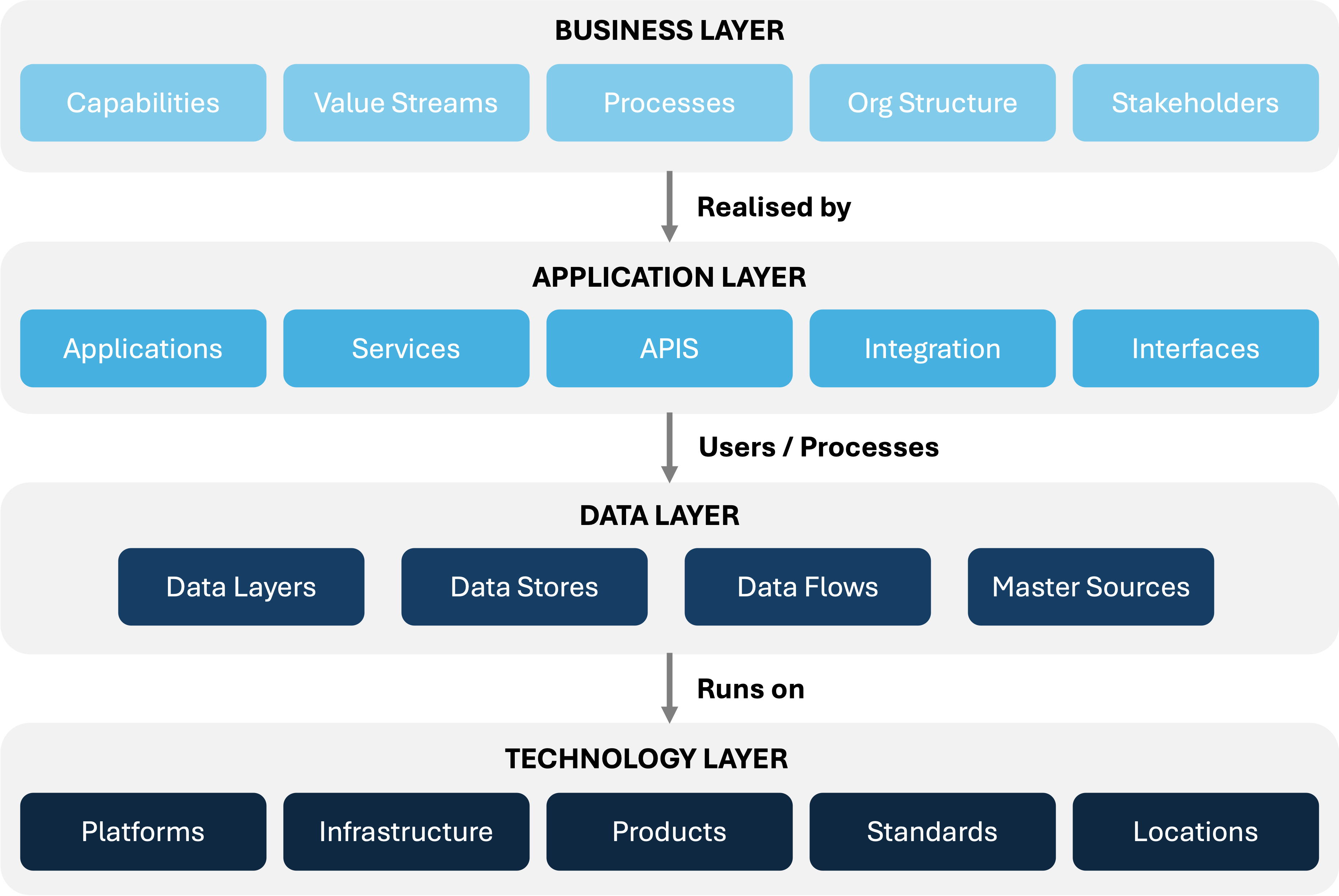
The power isn't in each layer separately — it's in the relationships between them. Which applications support which capabilities? What data flows between which systems? What technology underpins which applications? These relationships are what transform a list of things into an architecture
Business Architecture in the Registry
Business capabilities describe what the organisation does, independent of how it's done. They're stable over time even as the systems that support them change.
| Field | What It Captures |
|---|---|
| Capability ID | Unique identifier |
| Name | Capability name (verb-noun format: "Manage Customer Relationships") |
| Description | What this capability encompasses |
| Level | L1, L2, L3 in the hierarchy |
| Parent | Parent capability (for L2, L3) |
| Business domain | Which business area owns this |
| Strategic importance | How critical to strategy |
| Current maturity | How mature is current delivery |
| Target maturity | Desired maturity level |
| Applications | Which applications support this (relationship) |
The capability model becomes the bridge between business strategy and technology investment. "We're investing in Customer Experience" translates to specific capabilities, which map to specific applications, which reveals gaps and investment needs.
Value Streams
Value streams show how the organisation creates value — the end-to-end flow of activities that deliver outcomes.
| Field | What It Captures |
|---|---|
| Value Stream ID | Unique identifier |
| Name | Value stream name |
| Description | What value it delivers |
| Trigger | What initiates the stream |
| Outcome | What it produces |
| Stages | Ordered stages in the stream |
| Capabilities | Which capabilities are involved at each stage |
| Stakeholders | Who participates |
| Metrics | How performance is measured |
Value streams connect strategy to operations. They show where value is created and where friction exists.
Organisation Model
The registry tracks organisational structure as it relates to architecture:
| Field | What It Captures |
|---|---|
| Org Unit ID | Unique identifier |
| Name | Team, department, division name |
| Type | Business unit, IT team, shared service, etc. |
| Parent | Parent org unit |
| Capabilities owned | Which capabilities this unit is responsible for |
| Applications owned | Which applications this unit owns |
| Stakeholders | Key people |
This enables questions like: "Which teams are affected by this platform change?" or "Who owns the systems supporting this capability?".
Application Portfolio
The application layer is typically the heart of the registry — the inventory of systems that deliver business capability.
Application Inventory
Every application in your landscape should be registered:
| Field | What It Captures |
|---|---|
| Application ID | Unique identifier |
| Name | Official name and aliases |
| Description | What it does |
| Application type | Custom, COTS, SaaS, platform, etc. |
| Vendor | For commercial products |
| Version | Current deployed version |
| Business owner | Who owns it from business perspective |
| Technical owner | Who's responsible technically |
| Support contact | Who to call when it breaks |
Business Alignment:
| Field | What It Captures |
|---|---|
| Capabilities supported | Which business capabilities (relationship) |
| Business criticality | Critical, important, standard, low |
| User base | Who uses it, how many |
| Business processes | Which processes it supports |
Technical Profile:
| Field | What It Captures |
|---|---|
| Architecture pattern | Monolith, microservices, etc. |
| Hosting model | On-prem, IaaS, PaaS, SaaS |
| Deployment location | Data centres, cloud regions |
| Technology stack | Languages, frameworks, databases |
| Platforms | What it runs on (relationship) |
Lifecycle & Health:
| Field | What It Captures |
|---|---|
| Lifecycle stage | Planning, development, active, sunset, retired |
| Go-live date | When it entered production |
| Planned retirement | If sunset, when |
| Technical fitness | Overall technical health score |
| Business fit | How well it meets business needs |
| Architecture compliance | Compliant, deviation, exception |
Governance:
| Field | What It Captures |
|---|---|
| Oversight tier | Tier 1, 2, or 3 |
| Data classification | Highest data classification handled |
| Passport link | Link to full Architecture Passport |
| Last review date | When last architecturally reviewed |
Application Assessments
Beyond static attributes, the registry can track assessments:
(Tolerate, Invest, Migrate, Eliminate)
- Current state assessment
- Rationale
- Target action
- Timeline
- Maintainability score
- Scalability score
- Security posture
- Technology currency
- Documentation quality
- Strategic alignment
- User satisfaction
- Cost efficiency
- Operational importance
These assessments drive portfolio rationalisation decisions.
Integration & Dependencies
Understanding how things connect is often more valuable than understanding the things themselves.
Integration Inventory
| Field | What It Captures |
|---|---|
| Integration ID | Unique identifier |
| Name | Descriptive name |
| Source application | Where it originates |
| Target application | Where it goes |
| Direction | Unidirectional, bidirectional |
| Integration pattern | API, event, file, database, ESB, etc. |
| Protocol | REST, SOAP, SFTP, JDBC, etc. |
| Data exchanged | What data flows |
| Frequency | Real-time, batch, on-demand |
| Volume | Transactions per day/hour |
| Criticality | How critical is this integration |
| SLA | Response time, availability requirements |
| Owner | Who's responsible |
Interface Catalogue
APIs and interfaces exposed or consumed:
| Field | What It Captures |
|---|---|
| Interface ID | Unique identifier |
| Name | Interface name |
| Type | API, event topic, file drop, etc. |
| Application | Which application owns it |
| Direction | Exposed (provider) or consumed (consumer) |
| Protocol | REST, GraphQL, gRPC, etc. |
| Documentation | Link to API docs, Swagger, etc. |
| Version | Current version |
| Status | Active, deprecated, retired |
| Consumers | Who consumes this (for exposed interfaces) |
| Authentication | How it's secured |
Dependency Mapping
The registry should answer:
- Upstream dependencies: What does Application X depend on?
- Downstream dependencies: What depends on Application X?
- Transitive dependencies: If A depends on B and B depends on C, A has a transitive dependency on C
- Critical paths: Which dependency chains are most critical?
This is where EA tools really shine. Visualising a dependency graph across hundreds of applications is nearly impossible in documents or spreadsheets.
Data Flows
Beyond point-to-point integrations, track how data flows through the landscape:
| Field | What It Captures |
|---|---|
| Data flow ID | Unique identifier |
| Name | Descriptive name |
| Data entities | What data is involved |
| Source | Where data originates |
| Transformations | How it's transformed along the way |
| Destinations | Where it ends up |
| Frequency | How often |
| Latency requirements | How fast it needs to flow |
| Compliance considerations | Privacy, residency, classification |
Data Architecture
The data layer tracks how data is structured, stored, governed, and flows.
Data Entities
Logical data entities (often called "business objects" or "data subjects"):
| Field | What It Captures |
|---|---|
| Entity ID | Unique identifier |
| Name | Entity name (Customer, Order, Product, etc.) |
| Description | What this entity represents |
| Domain | Which data domain it belongs to |
| Data owner | Business owner of this data |
| Data steward | Technical steward |
| Classification | Data classification level |
| Retention | How long it's kept |
| Master source | System of record for this entity |
| Other sources | Systems that also hold this data |
Master Data Sources
For each data entity, which system is the "source of truth"?
| Field | What It Captures |
|---|---|
| Entity | Which data entity |
| Master system | Authoritative source |
| Distribution | How data flows to other systems |
| Sync mechanism | How copies stay in sync |
| Conflict resolution | How conflicts are handled |
Data Stores
Physical data storage:
| Field | What It Captures |
|---|---|
| Data Store ID | Unique identifier |
| Name | Database/storage name |
| Type | RDBMS, NoSQL, data lake, warehouse, etc. |
| Technology | Specific product (PostgreSQL, MongoDB, etc.) |
| Application | Which application owns it |
| Entities stored | Which data entities live here |
| Location | Where physically hosted |
| Classification | Highest data classification stored |
| Backup/DR | Backup and recovery approach |
Technology Landscape
The technology layer tracks platforms, products, standards, and infrastructure.
Technology Catalogue
Every technology in use should be catalogued:
| Field | What It Captures |
|---|---|
| Technology ID | Unique identifier |
| Name | Technology/product name |
| Vendor | Who provides it |
| Category | Language, framework, database, platform, tool, etc. |
| Subcategory | More specific categorisation |
| Current version(s) | Versions in use |
| Latest version | Latest available version |
| Support status | Vendor support status |
| License type | Commercial, open source, etc. |
| Applications using | Which applications use this (relationship) |
| Count | How many instances/deployments |
Technology Radar
The radar positions technologies by recommendation:
| Position | Meaning | Guidance |
|---|---|---|
| Adopt | Proven, recommended | Use for new development |
| Trial | Promising, evaluating | Use in limited contexts |
| Assess | Worth exploring | Research and evaluate |
| Hold | Don't start new usage | Maintain existing only |
| Retire | Phase out | Actively migrate away |
| Field | What It Captures |
|---|---|
| Technology | Which technology |
| Radar position | Current position |
| Movement | Moved in, stayed, moved out |
| Rationale | Why this position |
| Assessment date | When last assessed |
| Review date | When next review |
| Alternatives | What to use instead (for Hold/Retire) |
Platform Inventory
Platforms that applications run on:
| Field | What It Captures |
|---|---|
| Platform ID | Unique identifier |
| Name | Platform name |
| Type | Cloud provider, on-prem infrastructure, PaaS, etc. |
| Provider | AWS, Azure, internal, etc. |
| Services | What services it provides |
| Applications hosted | What runs on it |
| Environments | Dev, test, prod instances |
| Compliance certifications | SOC2, ISO27001, etc. |
| Contract/licensing | Commercial terms |
Standards
Technology standards in force:
| Field | What It Captures |
|---|---|
| Standard ID | Unique identifier |
| Name | Standard name |
| Domain | What area it covers |
| Description | What it requires |
| Rationale | Why this standard exists |
| Status | Draft, active, deprecated |
| Approved technologies | What's approved under this standard |
| Exceptions | Standing exceptions |
| Owner | Who owns this standard |
| Review date | When next reviewed |
Reference Architectures
Reference architectures provide target state guidance — how things should be built.
Enterprise Reference Architecture
| Field | What It Captures |
|---|---|
| Reference ID | Unique identifier |
| Name | Reference architecture name |
| Scope | What it covers |
| Description | Overview |
| Principles | Guiding principles |
| Target state diagram | Visual representation |
| Patterns | Patterns that implement this |
| Building blocks | Components used |
| Status | Current, evolving, deprecated |
| Owner | Who maintains it |
Domain Reference Architectures
More specific reference architectures for particular domains:
- Integration reference architecture
- Security reference architecture
- Data platform reference architecture
- Cloud landing zone architecture
- Identity and access architecture
Each follows similar structure to the enterprise reference, scoped to its domain.
Architecture Patterns
Reusable solutions to common problems:
| Field | What It Captures |
|---|---|
| Pattern ID | Unique identifier |
| Name | Pattern name |
| Category | Integration, security, data, resilience, etc. |
| Problem | What problem it solves |
| Context | When it applies |
| Solution | How it works |
| Consequences | Trade-offs and implications |
| Implementation guidance | How to implement |
| Examples | Where it's been used |
| Related patterns | Alternatives, complements |
| Status | Proposed, approved, deprecated |
Building Blocks
Reusable components at different levels of abstraction:
abstract, technology-agnostic:
- "Identity Provider"
- "Message Broker"
- "API Gateway"
- "Data Lake"
concrete implementations:
- "Azure AD B2C" (implements Identity Provider)
- "Azure Service Bus" (implements Message Broker)
- "Azure API Management" (implements API Gateway)
- "Azure Data Lake Storage Gen2" (implements Data Lake)
| Field | What It Captures |
|---|---|
| Block ID | Unique identifier |
| Name | Block name |
| Type | ABB or SBB |
| Description | What it provides |
| Implements | For SBBs, which ABB it implements |
| Technology | For SBBs, specific technology |
| Status | Approved, trial, deprecated |
| Implementation guide | How to use it |
| Examples | Reference implementations |
Roadmaps and Transitions
The registry doesn't just model current state — it models target state and the transitions between them.
Current vs Target State
For key entities (applications, capabilities, technologies), track:
| Field | What It Captures |
|---|---|
| Entity | What entity |
| Current state | Where we are today |
| Target state | Where we want to be |
| Gap analysis | What needs to change |
| Transition approach | How we'll get there |
| Timeline | When |
| Dependencies | What it depends on |
Architecture Roadmap
| Field | What It Captures |
|---|---|
| Initiative ID | Unique identifier |
| Name | Initiative name |
| Description | What it achieves |
| Type | Transformation, optimisation, compliance, etc. |
| Scope | What's affected |
| Current state | Starting point |
| Target state | End point |
| Milestones | Key milestones |
| Timeline | Start, end, key dates |
| Dependencies | What it depends on |
| Status | Planned, in progress, complete |
| Business case | Link to business case |
Transition Architectures
For complex transformations, intermediate states:
| Field | What It Captures |
|---|---|
| Transition ID | Unique identifier |
| Name | Transition name |
| Sequence | Order in the roadmap |
| Description | What this transition achieves |
| Architecture state | What the architecture looks like at this point |
| Duration | How long this state lasts |
| Entry criteria = | What triggers entry |
| Exit criteria | What must be true to exit |
Views and Visualisations
Raw data isn't useful without ways to see and analyse it. The registry should support multiple views:
Standard Views
Capability-to-Application Matrix: Which applications support which capabilities? Where are gaps? Where is redundancy?
Application Dependency Map: Visual graph of application interconnections. Click on an application to see what it depends on and what depends on it.
Technology Heatmap: Which technologies are where in the landscape? Colour-coded by radar position or support status.
Data Flow Diagram: How does data move through the enterprise? From source to destination through transformations.
Lifecycle View: Applications by lifecycle stage. What's being built, what's active, what's being retired?
Portfolio Health Dashboard: Technical fitness, business value, compliance status across the portfolio.
Roadmap Timeline: Gantt-style view of planned architecture changes over time.
Analysis Views
Impact Analysis: "If we change X, what's affected?" Follow relationships to understand blast radius.
Gap Analysis: Current capability maturity vs target. Where do we need to invest?
Rationalisation Candidates: Applications with low business value and poor technical fitness — candidates for retirement.
Technology Currency: Applications by technology currency — what's on supported versions, what needs updating?
Risk Concentration: Where is risk concentrated? Critical applications on retiring platforms, single points of failure, etc.
Registry Governance
Ownership Model
| Entity Type | Owner | Maintains |
|---|---|---|
| Capability model | Enterprise Architecture | Structure, definitions |
| Value streams | Business Architecture | Flow definitions |
| Applications | Application owners | Their application's record |
| Integrations | Integration owners | Their integration's record |
| Technologies | Technology Architecture | Catalogue, radar positions |
| Data entities | Data Architecture | Definitions, ownership |
| Standards | Domain architects | Their domain's standards |
| Reference architectures | Domain architects | Their domain's references |
| Registry structure | EA Operations | Metamodel, governance |
Data Quality
Registry value depends on data quality:
Completeness: Required fields populated. Key relationships captured.
Accuracy: Data matches reality. Regular validation against actual state.
Currency: Data is up to date. Review cycles enforced. Staleness flagged.
Consistency: Naming conventions followed. Categories used correctly. No duplicates.
Maintenance Triggers
Registry updates should be triggered by events:
| Event | Registry Action |
|---|---|
| New application deployed | Add application record, relationships |
| Application decommissioned | Update lifecycle status |
| Integration added/changed | Update integration inventory |
| Technology adopted/retired | Update catalogue, radar |
| Architecture decision made | Link decision to affected entities |
| Project started | Update roadmap, link to affected entities |
| Organisational change | Update org model, ownership |
Review Cycles
| Content Type | Review Frequency |
|---|---|
| Application records | Quarterly |
| Integrations | Annually |
| Technology radar | Quarterly |
| Capability model | Annually |
| Reference architectures | Annually |
| Standards | 6-monthly |
| Roadmaps | Quarterly |
The Governance Core in the Registry
The Architecture Registry isn't just another component of the Governance Core — it's the connective tissue that ties all the other components together. Passports, decision records, technical debt, tiered oversight, guardrails, and risk integration all live in or link through the registry.
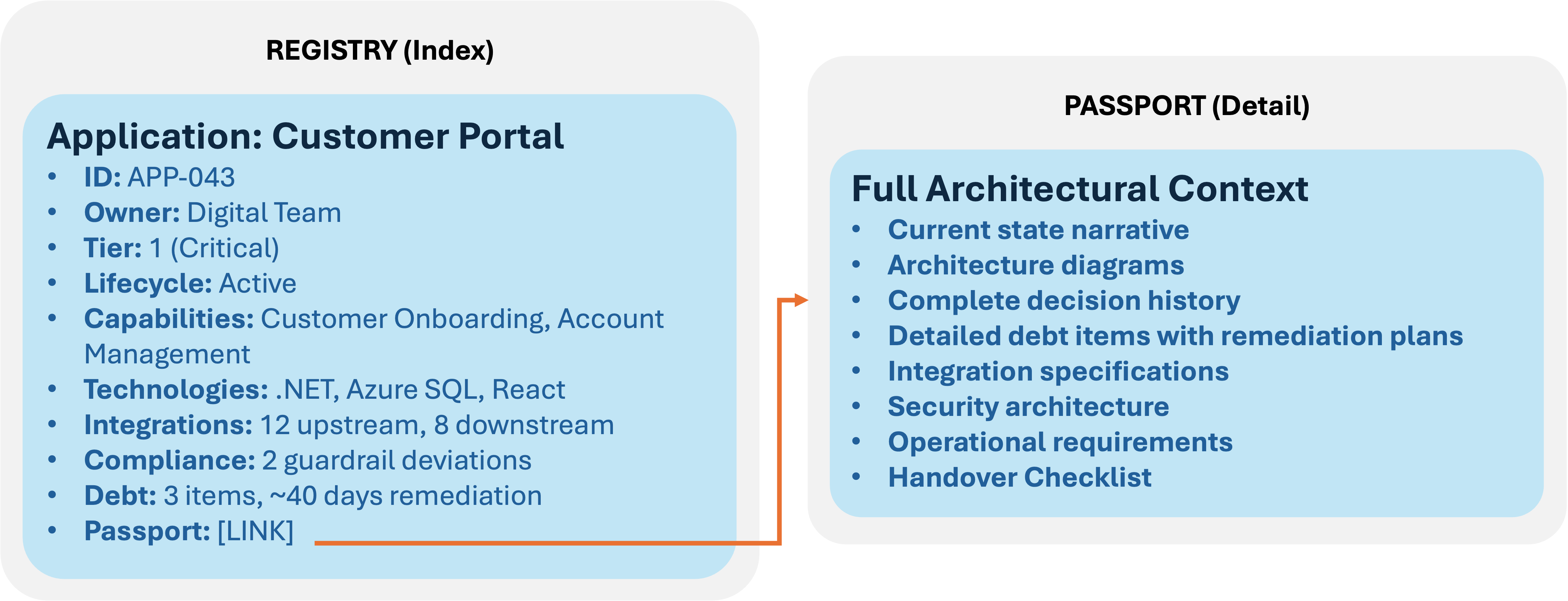
Registry role: Summary attributes, relationships, portfolio-level queries Passport role: Full context, detailed documentation, system-level depth
The registry answers "what do we have?" The passport answers "tell me everything about this system."
Decision Records
Decision records are indexed in the registry and linked to affected entities. This creates traceability from decisions to the systems, technologies, and capabilities they affect.
| Field | What It Captures |
|---|---|
| Decision ID | Unique identifier |
| Title | Short description |
| Date | When decided |
| Status | Proposed, accepted, superseded, deprecated |
| Decision type | Technology selection, pattern adoption, deviation, etc. |
| Affected applications | Which applications (relationship) |
| Affected capabilities | Which capabilities (relationship) |
| Affected technologies | Which technologies (relationship) |
| Guardrails touched | Which guardrails this relates to |
| Debt introduced | Any debt items created by this decision |
| Full record link | Pointer to complete decision record |
Query examples:
- "What decisions have affected this application?"
- "What applications are affected by this technology decision?"
- "What decisions introduced deviations from security guardrails?"
- "Show me all decisions made in Q3 that introduced technical debt"
The registry provides the index and relationships. The full decision record (with context, options considered, rationale) lives in the linked document or passport.
Technical Debt Register
The registry aggregates technical debt across the portfolio, providing visibility that individual passports can't.
Per-application debt (summary in registry, detail in passport):
| Field | What It Captures |
|---|---|
| Application | Which application |
| Debt count | Number of debt items |
| Total effort | Estimated remediation effort |
| Highest severity | Most severe debt item |
| Oldest item | Age of oldest unaddressed debt |
| Debt trend | Increasing, stable, decreasing |
Portfolio debt views:
| View | What It Shows |
|---|---|
| By application | Which systems have the most debt |
| By type | Architectural, security, technology currency, etc. |
| By severity | Critical, high, medium, low distribution |
| By age | How long debt has been outstanding |
| By owner | Who's accountable for remediation |
| By capability | Which business capabilities are most affected |
| Trend over time | Is total debt growing or shrinking |
Debt-to-risk linkage:
Every debt item in the registry tracks:
- Risk classification (what risk does this debt represent)
- Risk owner (who's accountable for the risk)
- Acceptance status (tracked, accepted, remediation planned)
- Escalation triggers (when this debt becomes a risk escalation)
This connects the Technical Debt Register to Risk Integration — debt is visible not just as work to be done, but as risk being carried.
Tiered Oversight
Every application in the registry has a tier classification that determines governance intensity:
| Field | What It Captures |
|---|---|
| Application | Which application |
| Current tier | Tier 1, 2, or 3 |
| Tier rationale | Why this classification |
| Last assessment | When tier was last reviewed |
| Tier factors | Scores on criticality, data sensitivity, etc. |
Tier factor tracking:
| Factor | Tier 1 (High) | Tier 2 (Medium) | Tier 3 (Low) |
|---|---|---|---|
| System criticality | Core business, customer-facing | Supporting, internal | Peripheral |
| Data sensitivity | Protected, personal, classified | Business-sensitive | Public, non-sensitive |
| Integration scope | Enterprise-wide, external | Multi-system, internal | Single system, isolated |
| Investment size | Above threshold | Moderate | Below threshold |
| Technology novelty | New to organisation | New to team | Established |
| Compliance impact | Regulatory affected | Policy affected | No impact |
Governance implications:
The tier classification drives:
- Review requirements (who must be involved in changes)
- Decision authority (who can approve deviations)
- Documentation depth (how detailed the passport must be)
- Monitoring intensity (how closely it's watched)
Portfolio views show tier distribution — how many Tier 1 vs Tier 2 vs Tier 3 systems, and whether that distribution is changing.
Guardrails
Guardrails live in the registry as first-class entities, with compliance tracked per application.
Guardrail records:
| Field | What It Captures |
|---|---|
| Guardrail ID | Unique identifier |
| Name | Short, descriptive name |
| Domain | Strategic, technology, data, security, integration |
| Type | Constraint, standard, principle, policy |
| Description | What the guardrail requires or prohibits |
| Rationale | Why this guardrail exists |
| Risk addressed | What risk this guardrail mitigates |
| Status | Draft, active, under review, deprecated, retired |
| Owner | Who owns this guardrail |
| Review date | When next reviewed |
| Exceptions | Any standing exceptions |
| Affected applications | Which applications this applies to |
Compliance tracking:
For each application-guardrail combination:
| Field | What It Captures |
|---|---|
| Application | Which application |
| Guardrail | Which guardrail |
| Compliance status | Compliant, deviation, exception, not applicable |
| Deviation record | If deviating, link to deviation decision |
| Exception approval | If exception, who approved and when |
| Remediation plan | If deviation, plan to return to compliance |
| Last assessed | When compliance was last verified |
Portfolio compliance views:
- Compliance by guardrail: Which guardrails have the most deviations?
- Compliance by application: Which applications have compliance gaps?
- Compliance by domain: How compliant are we in security vs technology vs data?
- Compliance trend: Are we becoming more or less compliant over time?
- Deviation aging: How long have deviations been outstanding?
Risk Integration
The registry provides the data foundation for architecture-related risk visibility.
Risk surfaces in the registry:
| Risk Source | Registry Data |
|---|---|
| Technical debt | Debt items with severity, effort, age |
| Guardrail deviations | Non-compliant applications with deviation records |
| Technology currency | Applications on retiring/unsupported technologies |
| Single points of failure | Dependency analysis showing concentration |
| Vendor exposure | Applications by vendor, contract status |
| Capability gaps | Capabilities without adequate application support |
| End-of-life systems | Applications approaching or past end of life |
| Security posture | Security guardrail compliance, control gaps |
Risk-based views:
| View | What It Answers |
|---|---|
| Risk heatmap | Where is architectural risk concentrated? |
| Tier 1 risk summary | What risks exist in our most critical systems? |
| Compliance risk | What regulatory/policy exposure do we have? |
| Technology risk | What's our exposure to retiring technologies? |
| Dependency risk | What are our single points of failure? |
| Debt-driven risk | Where is unaddressed debt creating risk? |
Escalation triggers:
The registry can flag when conditions meet escalation criteria:
- Tier 1 application with critical debt item
- Security guardrail deviation older than threshold
- Multiple deviations creating systemic pattern
- Technology approaching end of vendor support
- Debt remediation exceeding budget threshold
These triggers connect architecture governance to enterprise risk management.
How the Components Connect
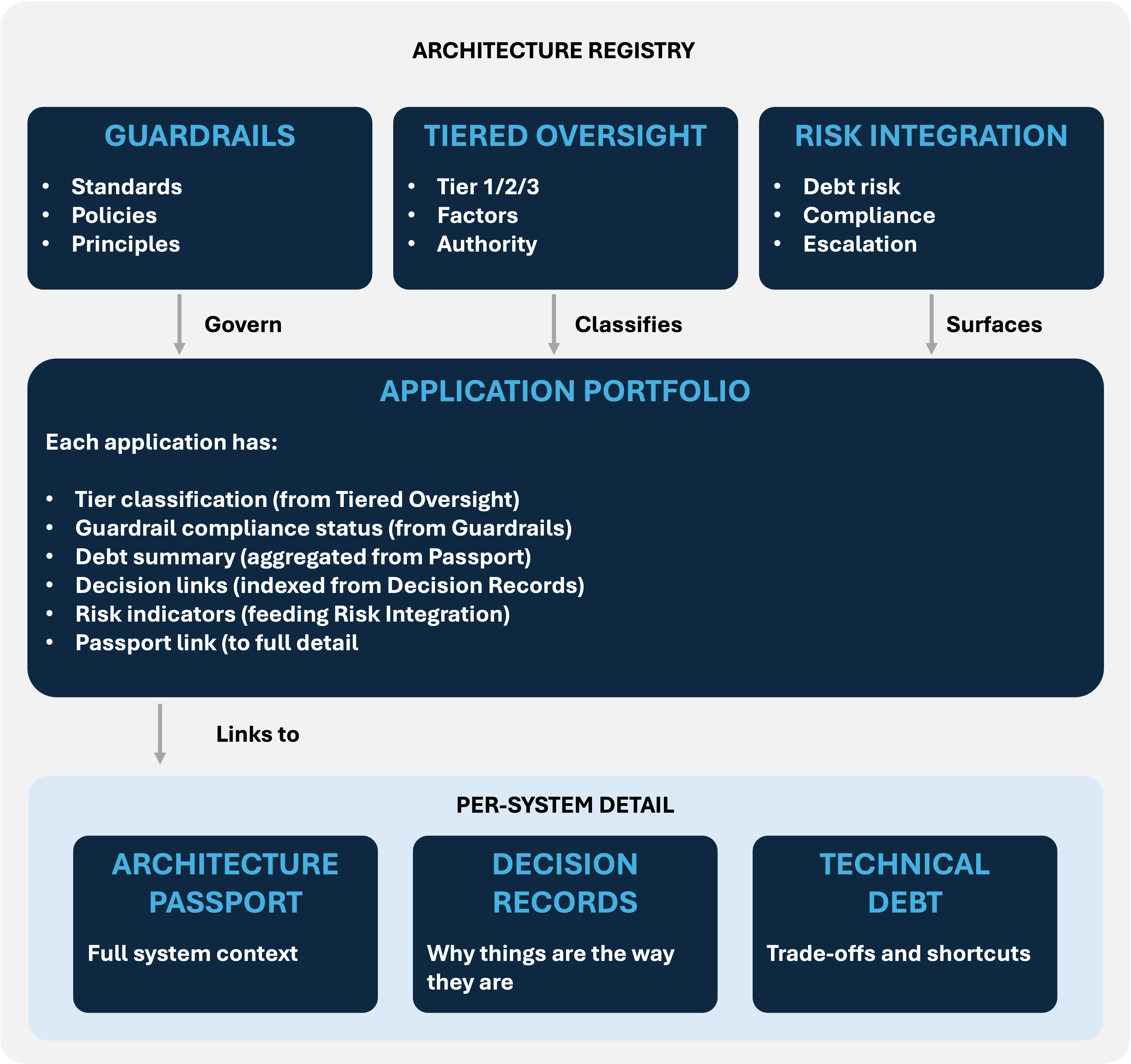
The registry is the index. It provides portfolio-level visibility, relationships, queries, and aggregation.
Passports are the detail. They provide system-level depth, full context, and operational documentation.
Decision records are the rationale. They explain why things are the way they are.
Debt items are the trade-offs. They track compromises and shortcuts that need attention.
Guardrails are the boundaries. They define what's acceptable and track compliance.
Tiered oversight is the classification. It determines governance intensity.
Risk integration is the lens. It surfaces architectural state as risk exposure.
All of these live in or connect through the registry. That's what makes it the backbone of the Governance Core.
Tool Considerations
When Spreadsheets Work
For small landscapes (under 50 applications), spreadsheets can work:
- Application inventory
- Technology catalogue
- Simple dependency matrix
Warning
Limitations hit quickly: no real relationship modelling, no visualisation, version control problems, scalability issues.
When You Need Tooling
Invest in proper EA tooling when:
- Application count exceeds ~50
- Dependency analysis becomes critical
- Multiple stakeholders need different views
- Audit/compliance requires formal records
- Roadmap visualisation is needed
- Impact analysis is frequent
Tool Options
Note
The XAF Connected Architecture and InnovateX Solutions doesn't explicitly recommend tooling, instead opting for flexibility across multiple tool options depending on the scale required within the organisation.
Enterprise-grade:
- LeanIX — cloud-native, strong application portfolio management
- Ardoq — flexible metamodel, good visualisation
- Mega HOPEX — comprehensive, heavyweight
- Orbus iServer — Visio integration, strong governance
Mid-market:
- Alfabet — SAP ecosystem integration
- ABACUS — government-focused
- Essential Architecture Manager — open source option
Lightweight:
- Confluence/SharePoint with structure — minimal investment, limited capability
- Custom-built — flexibility, maintenance burden
- Spreadsheets — simplest start, doesn't scale
Selection Criteria
- Metamodel flexibility: Can you model what matters to you?
- Visualisation: Can you see relationships clearly?
- Query/analysis: Can you answer the questions you need to?
- Integration: Does it connect to your other systems?
- Usability: Will people actually use it?
- Cost: Does the value justify the investment?
Common Pitfalls
Modelling everything with equal depth
You don't need the same level of detail for every application. Critical systems need comprehensive records. Peripheral tools need basic registration. Prioritise depth based on criticality and change frequency.
Registry as separate activity
If maintaining the registry is separate from actual architecture work, it won't stay current. Registry updates should be embedded in delivery workflows, project gates, and governance processes.
No relationships, just lists
Lists of applications, lists of technologies, lists of capabilities — without the relationships between them, you have inventories, not architecture. The value is in the connections.
Aspiring to model everything
Don't try to implement the full metamodel on day one. Start with what's most needed (usually application portfolio and dependencies), prove value, then expand.
Tool before practice
Buying an EA tool doesn't create architecture practice. Start with the practice — what do you need to know, how will you maintain it — then select tooling that supports the practice.
Getting Started
Week 1-2: Define scope
- What questions do you need to answer?
- What entities and relationships support those questions?
- What's your minimum viable registry?
Week 3-4: Establish structure
- Define your entity types and key attributes
- Define critical relationships
- Set up your tool (even if just structured spreadsheets)
Month 2: Populate core content
- Application inventory (start with Tier 1)
- Critical integrations
- Technology catalogue with radar positions
- Capability model (at least L1-L2)
Month 3: Add depth
- Expand application coverage
- Add data architecture elements
- Populate reference architectures
- Link to existing documentation (passports, decisions)
Month 4+: Operationalise
- Embed in governance processes
- Establish maintenance triggers
- Build views and reports
- Expand based on demand
The Registry's Role
The Architecture Registry is the structural backbone of Connected Architecture. It provides:
- Visibility: See the landscape — what exists, how it connects, what state it's in.
- Context: Understand why things are the way they are — capabilities, decisions, constraints.
- Analysis: Answer questions — impact analysis, gap analysis, rationalisation, roadmapping.
- Governance: Enable informed decisions — compliance tracking, health monitoring, risk visibility.
- Persistence: Institutional memory — survives team changes, organisational restructures, tool migrations.
Without a registry, architecture is tribal knowledge. With one, it's a managed asset that provides ongoing value.
Model what matters. Maintain what you model. Use what you maintain.
XAF Connected Architecture | Developed by InnovateX Solutions